Monday, December 1, 2014

Discoverer - Viewer , Plus and Desktop differences

These differences are for 10g versions, but they are pretty handy for making a general decision about the product type to use.
Reference: http://proudman.homestead.com

Function Desktop Plus Viewer
Create / Edit Query Yes Yes No
View Query With Dynamic Data Yes Yes Yes
BI Beans Based Charting No Yes Yes
Export To Microsoft Excel Yes Yes Yes
Integrated With Oracle Single Sign-On No Yes Yes
Create Worksheet Parameters Yes Yes No
Apply Parameters To Worksheet Yes Yes Yes
Create / Edit Conditions Yes Yes No
Create / Edit Calculations Yes Yes No
Save The Workbook Yes Yes Yes
Schedule Workbooks Yes Yes No
Export To XML ? Yes Yes
Export To PDF No Yes Yes
Drill To Link Yes Yes Yes
Cascading Parameters Yes Yes Yes
OLAP Support No Yes Yes
Command Line Interface Yes No No
Text Area No Yes Yes
Graphs created in Desktop Yes No No
Email Yes No Yes
Drilling to external program Yes No No
Hyperdrill to URL No Yes Display
Cascading Parameters Display Yes Display
Optional Parameters Display Yes Display
Conditional Formatting - (exceptions in Desktop) Yes Yes Yes
Stoplight Formatting Display Yes Display
Editing Stoplight colors No Yes No
Edit worksheet dialog Mandatory Optional No
Interactive Pivoting No Yes Yes
Save to File system Yes No No
Able to pick workbooks by user Display Yes Display
Scheduling workbooks Yes Yes No
Sharing workbooks Yes Yes No
Sharing results of scheduled workbooks No Yes No
Discoverer Connections No Yes Yes
Corporate logo No Yes Yes
Workbook logo Yes No No
Customized screen No No Yes(1) 1 - performed via Admin interface in OEM
Customized look and feel No Yes(2) No 2 - Plus with Sun Java - 1 of 4 types (Browser, Oracle, Plastic and System). Plus with Jinitiator - Plastic defaults to Browser
Bitmaps in title Yes No No
Resize column headings by sliding column separator Yes Yes No
Create new worksheet by dragging out of current workbook Yes No No
Rename worksheets Yes Yes No
Interaction with SSO No Yes Yes
Interaction with Portal No(3) No(3) Yes 3 - workbooks created in Plus and Desktop can be made to display in Portal
Preferences stored in registry Yes No No
Preferences stored centrally No Yes Yes
Choose EUL on log in No(4) Yes Yes 4 - set internally and must reconnect after changing
Analytic function templates No Yes No
Graph templates - only in Plus No Yes No
Count of all rows Yes No No
Uncouple Discoverer from database while creating worksheets No Yes No
Ability to create parameters that use indexes and values No Yes No(6) 6 - cannot create in Viewer but can use if created in Plus
3D heading gridlines No Yes No(6)
Interface Client Java HTML
Change Password No Yes Yes
Able to open multiple workbooks at same time Yes No No
Able to copy worksheets between workbooks Yes No No
Discoverer Timeout No Yes No
Assiging user defined help No No Yes(7) 7 - only but done via OEM
Automatically execute a worksheet No No Yes(8) 8 - performed by passing in URL
Ability to schedule and export in one step - only in Desktop using command line interface and a third-party scheduler Yes(9) No No 9 - using command line interface and third-party scheduler
Export to Excel iQuery - only available in Viewer No No Yes
Export Crosstab to Excel pivot table No Yes Yes
Subqueries - can only be created in Desktop but will work in Plus and Viewer Yes No(10) No(10) 10 - subqueries created in Desktop will work in Plus or Viewer
Calendar style date picker No Yes No

Wednesday, November 26, 2014

Linux,Netapp luns-- Disk Alignment

In these days, I m working with Netapp Luns.
While walking through my document archive; I have found a disk alignment approach , which can be implemented when using Netapp Luns in Linux ext3/ext4 filesystems. I want to share it with you.

Using fdisk 's expert mode in Linux , we define the disk geometry for mapped luns;

For example:

fdisk /dev/mapper/NetAppU1150g

We use "x" to go into the expert mode and set the head , sector and cylinder sizes as follows;

head=256
sector=56
cylinder= (The size of disk in bytes)/512/256/56

Then we return to the normal mode and create our new partition with the default inputs.
Then we use "w" to save and exit.

Extra info:

Host file system need to be aligned with a Storage Lun, in order to achieve best performance.
This can be accomplished specifying the correct starting sector or logical block address (LBA) for the partition, and filesystem should be configured to use the same or multiple of the Storage block size..

On Linux , you can configure a partition and filesystem using fdisk (x option)

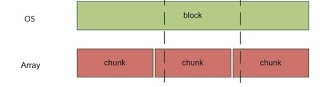
Alignment is important, and should be considered for Storage IO performance.Otherwise, you can end up with the following;

Misaligned filesystem and LUN:


It is almost equal -> doing 2 Storage IO for 1 OS IO..

RAC,Linux -- asm libraries , Do we need to install asmlib, ASM kernel driver and ASM support in OEL6?

Normally, there are 3 packages which need to be installed in Linux environment that will run Oracle ASM.
These packages are;

oracleasm (The kernel driver)
oracleasmlib (ASM libraries)
oracleasm-support  (ASM Support scripts)

We normally install these one by one, and use our ASM instances in our RAC environment accordingly.
On the other hand; I have realized that the things are a little different, when you use Oracle Enterprise Linux 6 for your RAC environment.
There are 3 facts for a RAC installation based on an Oracle Enterprise Linux 6)

1)The oracleasm kernel driver is built into the Unbreakable Enterprise Kernel for Oracle Linux 6 and does not need to be installed manually.
2)oracleasm-support can be choosed while installing Oracle Linux 6, so we do not need to install it manually.
But if we want to install it manually; the oracleasm-support package can be downloaded from the Unbreakable Linux Network(ULN) if you have an active support subscription, or from http://public-yum.oracle.com if you do not.
3) The oracleasmlib packages still need to be installed manually, it can be downloaded from  "http://www.oracle.com/technetwork/server-storage/linux/asmlib/ol6-1709075.html" -> 


Intel EM64T (x86_64) Architecture


Tuesday, November 25, 2014

EBS,Linux -- fork: retry: Resource temporarily unavailable, limits.conf has no effect in Redhat

The resource temporarily unavailable error is actually self explanatory. It means, OS has resource that the process needs but these resources can not be given to the process at the moment.
The interest of ours as Linux Admin should be the cause of this error and ofcourse the solution to that..
This error may have critical effects, such as ;

Cant starting the EBS services;
/u01/fs2/inst/apps/ERMAN_ERBANT/admin/scripts/adstrtal.sh: fork: retry: Resource temporarily unavailable

Cant using basic commands;
 ps aux
-bash: fork: retry: Resource temporarily unavailable

ps -ef |grep pmon
bash: fork: retry: Resource temporarily unavailable

As written in the error lines, the process can not fork. As known; fork() creates a new process by duplicating the calling process.
The cause of the error actually comes from the OS limits and here is the checklist for finding the cause..

First; we check the /etc/sysctl.conf and /etc/limits.conf... In these two files we try to find a clue. We check for undersized parameter values such as Max Process count and Max File Descriptor count..
Note that: fork makes me directly think of the Process counts, but File Descriptor check is a nice-to-have thing in these kind of OS limit errors.

Note that : Tthe activities such as checking the memory using free command or using df command to check the disk space are unrelevant ..

Okay lets explain the problem determination and the solution by walking through an example scenario;

Problem :
/u01/fs2/inst/apps/ERMAN_ERBANT/admin/scripts/adstrtal.sh: fork: retry: Resource temporarily unavailable


Here is an example sysctl.conf: 

net.ipv4.ip_forward = 0
# Controls source route verification
net.ipv4.conf.default.rp_filter = 1
# Do not accept source routing
net.ipv4.conf.default.accept_source_route = 0
# Controls the System Request debugging functionality of the kernel
kernel.sysrq = 0
# Controls whether core dumps will append the PID to the core filename.
# Useful for debugging multi-threaded applications.
kernel.core_uses_pid = 1
# Controls the use of TCP syncookies
net.ipv4.tcp_syncookies = 1
# Disable netfilter on bridges.
# net.bridge.bridge-nf-call-ip6tables = 0
# net.bridge.bridge-nf-call-iptables = 0
# net.bridge.bridge-nf-call-arptables = 0

# Controls the default maxmimum size of a mesage queue
# kernel.msgmnb = 65536
# Controls the maximum size of a message, in bytes
# kernel.msgmax = 65536
# Controls the maximum shared segment size, in bytes
kernel.shmmax = 68719476736
# Controls the maximum number of shared memory segments, in pages
# kernel.shmall = 4294967296
kernel.sem = 256 32000 100 142
kernel.shmall = 2097152
kernel.shmmni = 4096
kernel.msgmax = 8192
kernel.msgmnb = 65535
kernel.msgmni = 2878
fs.file-max = 6815744
fs.aio-max-nr = 1048576
net.ipv4.ip_local_port_range=9000 65500
net.core.rmem_default = 262144
net.core.rmem_max = 4194304
net.core.wmem_default = 262144
net.core.wmem_max = 1048576

We are interested for the fs.file-max above.. It is 6815744, actually pretty good.

Here is an example of limits.conf:

* hard nofile 65536
* soft nofile 4096
* hard nproc 16384
* soft nproc 1024
* hard stack 16384
* soft stack 10240

Okay.. In limits conf , we have soft nproc 1024 and hard nproc 16384.

These values seem good.. They actually seem okay when you take Oracle Database installation document as reference, but there is an important info: These values are actually suggested minimum values, so they should be increased according to the situation or lets say according to the load & concurrency.

Okay.. After the introduction ; here is the fd counts, process counts and the ulimits of the problematic OS user at the problematic moment;

cat /proc/sys/fs/file-nr
26016 0 6815744

26016 ( total allocated file descriptors since boot)
0 ( total free allocated file descriptors)
6815744 ( maximum open file descriptors)

lsof | wc -l (note that: lsof display allocated file descriptors a little higher than normal -- so it is consistent wtith the file-nr output)
33572

However, this control  is not right, becuase these 33572 is total number of open files.. Remember our nofile limits are per process.
In order to monitor the open files per process , we may use ;
for p in /proc/[0-9]* ; do echo $(ls $p/fd | wc -l) $(cat $p/cmdline) ; done | sort -n | tail
In a crowded EBS application server, I see max 650,660 files opened by a process.

ps -eLF | grep oracle| wc -l ( !!!! the user oracle has 1029 processes)
1029

Note that: nproc limit is per user (not per process)

Lets look at the limits of Oracle user

ulimit -a
core file size (blocks, -c) 0
data seg size (kbytes, -d) unlimited
scheduling priority (-e) 0
file size (blocks, -f) unlimited
pending signals (-i) 95145
max locked memory (kbytes, -l) 64
max memory size (kbytes, -m) unlimited
open files (-n) 8192
pipe size (512 bytes, -p) 8
POSIX message queues (bytes, -q) 819200
real-time priority (-r) 0
stack size (kbytes, -s) 10240
cpu time (seconds, -t) unlimited
max user processes (-u) 1024
virtual memory (kbytes, -v) unlimited
file locks (-x) unlimited

As you may guess , this oracle OS user have reached its process limits at the problematic moment, and it seems this creates ourr fork problem..

The solution here is increasing the proc values and restarting our shell processes. Reboot also works for this purpose but it is not necessary. What we need to do is edit the limits.conf using root, and then relogin to our oracle account and start our applications processes. In addition we need to be sure that in our login file -> session required pam_limits.so should be present..


Note that:
Watch out the PAM extra configuration:
Because in some releases PAM provides a file which overrides the settings in limits.conf for the number of processes.. If this is the case , then the modification should be done in that file.

This behaviour is explained as a bug record in Redhat:


One last thing:
An alternative can be using the following script in the .bash_profile of the problematic os user:

if [ $USER = "oracle" ]; then

        if [ $SHELL = "/bin/ksh" ]; then

              ulimit -p 16384

              ulimit -n 65536

        else

              ulimit -u 16384 -n 65536

        fi

fi

RAC -- Preparing for the installation -- requests

RAC installation is a complex process which consists of several sub processes.
Preparing for RAC is the starting point among these processes.
In preparing phase, we as Database Administrators,RAC Admins deliver our system requirements to the client, we deliver our requirements by explaining the RAC and the related system concepts briefly.
Following is a system requirements paper delivered by me.. It was written pretty quickly and delivered after a RAC pre-install meeting with the client. It also contains the brief explaination about the migration process.
RAC system mentioned in the paper was supposed to be 11gR2 Linux RAC consisting of two nodes..

->
RAC nodes will be Oracle Linux 6.5 64 bit, so Oracle Linux 6.5 iso file should be there for us.. It should be burned to DVD or mounted to the servers using ILOM/ILOM/etc. as Image file to before the installation.

After OS installation, Oracle Grid and Rdbms software installations will be done.
There will be 2 Diskgroups, DATA and RECO and the system will be ready for migration at this point.

RMAN, and rconfig will be used for the migration.. (Rman convert option + rconfig together will be used for Windows Single to Linux RAC migration process here)

The whole process will be 3-4 days.

A diagrammatic explaination of Oracle RAC:


The disks which will be presented by SAN should be in form of 8 lun( For ex:  rather than having 1x 1600 gb , we prefer  8x200 gb luns) We want 8 luns because the environment has multipath with 2 active paths, thus we prefer active path *4 luns for ASM. Disks should be aligned for ASM use.. 

In network side, the ip addresses and hostname should be ready before the installation day
Firewalls should be configured properly for RAC public ips and vips for client-applicaiton-database communication.

Network Requirements:

Public IPs , Private IPs, Virtual IP's ve SCAN IPs:

In both of the nodes:

We'll have 1 public , 1 private and 1 virtual ip addresses.
We'll have 3 Scan ip addresses and one scan hostnsame defined for these 3 ip addresses.. The scan ip and hostnames will be only on DNS.. A DNS with round robin capability.
We'll use bonding in Linux tier both for private and public interfaces.. So Network configuration, cabling and switch configuration should be done accordingly.

An Example Configuration:

Note: Public IPs, Virtual IPs and Scan s must be on the same subnet.
Node 1:

Public hostname :osrvdb01, public ip: 10.35.120.xx /255.255.255.0 --configured on the server before the installation, in DNS also..
Private hostname: osrvdb01-priv , private ip : 192.168.10.x /255.255.255.0 --configured on the server before the installation in its own subnet .NO Dns configuration.
Virtual hostname : osrv01-vip, virtual ip: 10.35.120.yy /255.255.255.0 --configured on DNS before the installation.


Node 2:

Public hostname :osrvdb02, public ip: 10.35.120.zz /255.255.255.0 --configured on the server before the installation, in DNS also..
Private hostname: osrvdb02-priv , private ip : 192.168.10.x /255.255.255.0 --configured on the server before the installation in its own subnet .NO Dns configuration.
Virtual hostname : osrv01-vip, virtual ip: 10.35.120.tt /255.255.255. --configured on DNS before the installation.

--once the cabling will be done, we ll configure the network interfaces and bonding in the linux tier.
Bonding will be active-backup.. It can be active-active load balanced if requested to be so.


Additionally;

3 scan entry defined in DNS:

erm-scan : 10.35.120.aa /255.255.255.0 --should be configured on DNS before the installation.
erm-scan : 10.35.120.bb /255.255.255.0 --should be configured on DNS before the installation.
erm-scan : 10.35.120.cc /255.255.255.0 --should be configured on DNS before the installation.

Sunday, November 23, 2014

EBS and Oracle Database 12c certifications

At the moment Oracle Database is certified to work with the following E-Business Suite versions.
I 'm happy to see 12.1.3 there. Also , I was not excepting to see 11.5.10.2  but it is also pleasing because there are several customers still using 11.5.10.2.

Certification info is as follows;

  • Oracle Database 12.1.0.2.0 is certified with Oracle E-Business Suite 12.1.3.
  • Oracle Database 12.1.0.1.0 is certified with Oracle E-Business Suite 12.2.4, 12.2.3, 12.2.2 , 12.1.3 , 12.0.6 and 11.5.10.2.
It is also interesting to see that Database 12.1.0.2.0 is certified with only EBS 12.1.3..

Anyways , I m sharing the roadmap to use the latest Oracle Database and E-Business Suite together and the documented to be followed in sequence ->


12.2.0 installation:
Oracle E-Business Suite Installation and Upgrade Notes Release 12 (12.2) for Linux x86-64 (Doc ID 1330701.1)

12.2.4 Upgrade: 
Oracle E-Business Suite Release 12.2.4 Readme (Doc ID 1617458.1)


12C Db uprade:
Interoperability Notes Oracle EBS 12.2 with Oracle Database 12c Release 1 (Doc ID 1926201.1)


Thursday, November 20, 2014

Toad for Oracle -- OCI cant initialize error

Normally, I dont write about Toad.. Actually I dont write about any client tools, but this time I m writing for Toad because I like to write the undocumented things :)

The error is the famous "OCI cant initialize" error. Oracle Call Interface (OCI) stands for the Oracle Call Interface , and it is the comprehensive, high performance, native C language interface to Oracle Database. 
Altough the cause seems to be realted with a problem in OCI initialization, it is actually a result..


The error is encountered when we try to connect to a database. any database actually.
The error may be encountered one day, without any reason.
OCI error may be just for some users.. Even if all the users are using a single toad binary through the Windows Terminal Server, this error may be seen only by some users..


The solution is to delete the directory named AppData\Roaming\Quest Software\Toad for Oracle for the problematic users.. Note that : if you delete this directory your license info, your password and your connection information will be deleted too.
An alternative may be to delete the directory of the problematic user and copy the same directory from another user.. Like copying C:\Users\erman\AppData\Roaming\Quest Software\ to C:\Users\ali\AppData\Roaming\Quest Software

AppData\Roaming in Windows is where programs on your machine store data that is specific to your user account. The folder is normally hidden, you need to display the hidden files to make operations on it.
So the cause must be something like a logical corruption or a security problem introduced with a new configuration in the files of Toad located in the Roamin folder.
Anayways, you dont need to reinstall Toad if you get this OCI cant initialize error...Try the solution that I have mentioned above in the first place :)

Weblogic -- AppSecurityContext.setApplicationID.null error when using Nodemanager //Diagnostics

You may encounter AppSecurityContext.setApplicationID.null error when starting your Weblogic application in Weblogic console.
It happened to me and I have made a 6 hour diagnostic to find the cause of this error.
On the other hand; once the cause is found, it is easy to take the corrective action.


Actually, in my opinion we dont need to deal with this kind of errors as Apps Dba's or even as Weblogic Admins..
On the other hand; dealing with this kind of errors and correcting them make me happy in a way :).
But I must admit that I started to think that day by day things in Oracle World are getting difficult rather than getting easier...

Okay, lets take a look at the error.

The error stack is something like the following;
java.security.AccessControlException: access denied (oracle.security.jps.JpsPermission AppSecurityContext.setApplicationID.null)
at java.security.AccessControlContext.checkPermission(AccessControlContext.java:374)
at java.security.AccessController.checkPermission(AccessController.java:546)

The error appears when starting an Entprise Application deployed in the Weblogic.

The error only appears if the Managed Server that configured to run the Entprise Application is started using the Node Manager.. In other words; if we start the Managed Server using command line(sh startManagedServer ERMANServer t3://ermanhost:7003) ; the error is not seen, Enterprise Application can be started without any problems..

So, as you may guess, the problem is related with the Node Manager, but it is hard to find the root cause as this is a specific java error..

Fortunately, it is possible to understand that it is related with a java security pattern, as it comes from the java.security package.

Anyways , I will keep it short..
One way or another I have found that the problem is caused by a missing environment variable or a missing command line arguments related with the java process that represents the Managed Server.
When the process (Managed Server) is started using Node  Manager, there must be a missing/errornous environment variable or java command line argument which causes this error.

To find this missing argument or lets say environment variable; I have made a test..
I started Managed Server two times and recorded its command line using ps -ef..

Firstly started the Managed Server using NodeManager and recorded its command line.
Then started the Managed Server using startManagedServer script and recorded its command line.
Lastly I compared these two with each other and saw the difference..

The command line of the Manager Server process which was started using startManagedServer.sh was  longer..
Thus by using this testing technique, I concluded the problem..
"The problem was caused by the start command that was used by the Nodemanager to start the Managed Server."

The start command was missing some command line arguments, as it was shorter than the command line of the startManagedServer script.

Then I realized that the error is related with security.. Also realized that the security is maintained using jps-config.xml. This config file is actually the configuration of the Java Policy Store (JPS) it is used to configure Policy, Credential, Key Store, Login Module and User Identity Store location.
It is located in $DOMAIN_HOME/config/fmwconfig, and it is supplied to the java processes using the parameter -Doracle.security.jps.config..

So , when started from the Nodemanager , it was clear that the ManagedServer was missing this config and the Application located in this ManagedServer can not be started because of this.

The solution have been stated when I saw the fine setDomainEnv.sh..
This file was sourced before starting the Managed Server using startManagedServer.sh..

In setDomainEnv.sh  I saw an export of the environment variable EXTRA_JAVA_OPTIONS.
This environment variable was used to set some additional command line arguments like jps-config!

There were several environment variables in EXTRA_JAVA_OPTIONS though..
It was like EXTRA_JAVA_OPTIONS=/erman/java/blabla:$ERMAN:$ERMAN2... and so on.

To have a plain text of it; I used echo $EXTRA_JAVA_OPTIONS just after sourcing the setDomainEnv.sh..

Once I got the plain text, I opened the Weblogic console and write this plain text into the server start tab of the problematic Managed Server..

After I have done this, the error dissapeared. Our ADF Enterprise Application could start even if its Managed Server was started using Node Manager..


Another info that I have gathered is that Node Manager reads the needed command line arguments from the server-start options of related Managed Server. If it cant find any server-start option for a particular Managed Server, it starts the Managed Server with default java arguments and leads this error.

Following is the server-start configuration that I have made to overcome this error.


I hope you will find this useful.

Weblogic -- HACMP Configuration, IP Address Change

I have done several Oracle implementations in AIX environments. From the Oracle's perspective , the technical work in AIX implementations are similar to the Oracle on Linux implementations. Ofcourse there are some differencse like using a different Package manager, and  executing different commands ,which effect our implementations.
On the other hand , these differences are not as big as a Senior Linux admin cant handle.
Even clustering in AIX is as so similar. I m talking about HACMP here.

As you may know; HACMP(High Availability Cluster Multiprocessing) is IBM's solution for high availability. It can be used on the AIX and IBM System p Linux.
Without any other clustering software like Weblogic clustering or Oracle Rac, Active/passive OID cluster can be build on top of  IBM HACMP Cluster..
The key point in here is the service ip used by the HACMP cluster nodes.. By using the service ip, applications and databases can run on all the nodes of the cluster in case of failover, without any problem , without any manual intervention.
Ofcourse, some of the big companies like the companies in Banking sector use HACMP for High Availability, and they expect our Oracle products to be HACMP aware.. They actually expect Oracle products to work/start without a need for reconfiguration even after a Node switch operation.
I have done this type of configuration for Oracle Database, OID 11g, SSO 10g and so on, but this time I will explain the behaviour of a pure Weblogic in this kind of HACMP node switch situation.

Normally, OID 11g , SSO and other we need to make configurations right. Take OID 11 as an example, it is working on its own Weblogic but it has components still controlled with opmn, that 's why extra effort is required to configure OID 11g to work with HACMP. The configuration is required to make an application like OID to start on a new node when a cluster node switch occurs. Once this configuration is done , Weblogic OID services can be started up in the new node without any need for reconfiguration .
Following action plan is good example for such a configuration;

1)Login to weblogic application console> Add a new machine with listen address updated to service-hostname>relate Admin Server and wls_ods1 managed server with this machine.
2)In Weblogic administration console change the listen addresses set for the Admin server and wls_ods1 managed server to the service-hostname.
3) Change the component registration setting in opmn with the following;
$ORACLE_INSTANCE/bin/opmnctl updatecomponentregistration -adminHost localhost -host <SERVICE-HOSTNAME> -adminPort 7002 -adminUsername weblogic -componentType OID -componentName oid1 -Port 3060 -Sport 3131
4)Use manage DIPServerConfigmanage to set DIPServer oidhostport to the service-hostname:port
For example: manageDIPServerConfig set -h localhost -p 7006 -D weblogic -attr oidhostport -value <SERVICE-HOSTNAME>:3060
5) Change all the hostnames declared in $DOMAIN_HOME/opmn/toplogy.xml to reflect the service-hostname
6)Look into start/stop scripts, change the hostname if declared any.

On the other hand; for a standalone Weblogic which may provide an Application Server environment for an ADF application , there is no effort needed to make it Cluster aware.

In Application server like Weblogic , the cluster awereness is supplied through the cluster service-name or cluster service ip.. So, when your application server and its services use service-name , actually when they listen on the service name, or let's say when they bind to the service name, they become cluster aware.. I mean when a node switch occurs, they may be started on the new node without a need for a reconfiguration.. It is because this service-name and its interface is present on all of the nodes in a cluster.

 When we talk about a pure weblogic, we said that there is no need to make any configuration to support this.

Okay. Lets prove it..

When you execute netstat to see the address of the admin server's port, or to see the address of the managed server's port on a Weblogic Server which is running on a AIX, you will see that; Weblogic listens on all of the available ip addresses on a  machine..

Following is an example of a Weblogic which listen on all the available ip addresses on a AIX machine, which is a member of a HACMP cluster...

local ip, service ip and localhost...

Admin Server is listening on all the available ip addresses.

           LISTEN
tcp        0      0  10.87.23.62.7006       *.*                    LISTEN
tcp        0      0  10.87.23.65.7006       *.*                    LISTEN
tcp        0      0  127.0.0.1.7006         *.*                    LISTEN

Managed Server is listening on all the available ip addresses.

          LISTEN
tcp        0      0  10.87.23.62.7009       *.*                    LISTEN
tcp        0      0  10.87.23.65.7009       *.*                    LISTEN
tcp        0      0  127.0.0.1.7009         *.*                    LISTEN


So, as the Weblogic listens on all available addresses, it also listens on the service ip..
Thus we dont need to reconfigure our Weblogic Server to be cluster awarer, it is already cluster aware :)
This behaviour of weblogic is actually caused by not specifying a Listen address in both Admin Server's and Managed Server's configuration..


Weblogic Server MBEAN Reference:

If a server's listen address is undefined, 
clients can reach the server through an IP address of the computer that hosts the server, 
a DNS name that resolves to the host, or the localhost string. 
The localhost string can be used only for requests from clients that running on the same computer as the server.

So based on this info; a pure weblogic works compatible with the HACMP cluster.
Nevertheless we may want to  configure both Admin Server and Managed Server to listen on service ip address only.
This can be accomplished by modifiying the config.xml or using Weblogic console... 
On the other hand; I dont see any need for this :)

EBS 12.2 - Country-Specific Functionalities

One of my collegue asked me the purpose of Country-Specific Functionalities we choose during the installation of EBS 12.2.

Actually we are talking about the following rapidwiz installer screen here;


As you see above , installer wants us to choose a Region... Normally I choose Turkey in here(as our customers are located in turkey, and their workers are in Turkey and they are Turkish), but doing these things blindly is not a good thing , that 's why I m here writing this post about this particular screen.

Okay, this screen actually provides us an opportunity to activate the standart Product localizations delivered by  the RapidWiz installer. These localizations are delivered in the standard product by Oracle Applications Development.. That 's why the localizations which we install after the installations are called Add-On localizations..

Actually there are 3 type of localization in EBS;

  • Product Localizations: Delivered in the standard product by Oracle Applications Development
  • Add-on Localizations: Delivered by the Regional Field Centers (Add-on Localization Teams) via My Oracle Support
  • Partner Localizations: Delivered by partners including ISVs and system integrators
So , we choose the Product Localization in this screen. As I mentioned before; Product Localizations are standard product features and are installed when you run Rapid Install. You simply need to license those you wish to use; this can be achieved from Rapid Install during the initial install, or from License Manager in Oracle Application Manager at a later stage
You may also notice that there are several countries to choose in this installation screen.

One more thing about this screen; The product localization are actually grouped.. I mean when you choose a country here, you actually activate the product localization of a particular region.. 

Product Localizations are available for Asia Pacific, Europe,Americas, China and India. They are divided into four main categories:

Regional Localizations (JG)
Asia/Pacific Localizations (JA)
European Localizations (JE)
Latin America Localizations (JL)


So, when you choose Argentina here; then Latin American Localizations (JL) will be activated.

In addition to that ; there are other legal requirements that are common for several countries. Those "shared functionalities" are included in the Regional Localizations (JG). JG is automatically activated for any country that require localizations.

For EBS 12.2 installations&upgrades, you may follow my Installation documents in parallel with Oracle Support Documents:
http://ermanarslan.blogspot.com.tr/2014/04/ebs-oracle-ebs-1220-fresh-installation.html
http://ermanarslan.blogspot.com.tr/2014/03/ebs-oracle-ebs-122-vision-installation.html
http://ermanarslan.blogspot.com.tr/2014/06/ebs-122-non-rac-asm-installation.html
http://ermanarslan.blogspot.com.tr/2014/04/ebs-1220-to-1223-upgrade-adcdelta4.html
http://ermanarslan.blogspot.com.tr/2014/06/ebs-122-ebs-on-virtualized-oda-x4-2.html
http://ermanarslan.blogspot.com.tr/2014/05/ovm-oracle-vm-server-328-installation.html
... and more.. Just search EBS 12.2 in my blog , you will find several documents and real life examples about EBS 12.2 installations & problems-solutions & upgrades & migrations and so on...