No matter the application code is delivered by Oracle or not, we do see Weblogic in our implementation projects.
Like the FMW products such as OAM, OID and SOA use it as a built-in application server, other important Oracle application like EBS makes use of the enhanced capabilities of Weblogic Server in its application tier.
In addition to these packaged Oracle applications, we also see thatcustom java code running on Weblogic and new projects are deployed on it.
Most of the applications residing on Weblogic and apps tier, have also a database layer for storing and querying data.
When it comes to deciding on the DR implementation, we easily conclude on the database disaster recovery methods, don't we?
For instance, we directly decide to use the Data Guard if the database in the source and target environments are both Oracle. Only if the database is not an Enterprise Edition Oracle Database (which means Data Guard can not be used), we think about other alternative solutions.
So far so good.
However; building and deciding on a correct disaster recovery solution for the Weblogic/the apps tier, is usually a little bit compex for us, for the DBAs.
In this post, I will shed a light on this subject by giving you the required method and prerequisities for it.
First of all, Weblogic DR implementation can be done by replicating the Weblogic filesystem basically.
We can either do it by a storage replication (like Netapp's Snapmirror) or by using a 3rd party tool (like rsync)
If we don't have a storage environment, which is capable of replication the Weblogic filesystem across storages, then we can still implement our DR using a tool like rsync.
The replication that must be done for feeding the DR environment should be an as-is replication.
Such a replication should be done automatically (for instance using a scheduler like crond) and it is recommended to replicate the Weblogic filesystem at least once in a day.
This replication can be done while the Weblogic application server is running.
Patching activities should be done on the primary first.
After a successful patching operation, the replication routine should be triggered manually to reflect the changes directly to the Weblogic DR filesystem.(considering the DB is already being replicated in the backend -- a manual database syncronization can also be triggered after these patching activities)
As for the switchover and failover operation;
If the the hostname of the primary Weblogic Server and the hostname of DR site Weblogic Server are the same, then we can start the services directly without doing anything extra in case of a failover/or switchover. (ofcourse we need to change the direction of the replication)
However; If the hostname of the primary Weblogic Server and hostname of the DR site Weblogic Server are different, then we need to configure a virtual hostname for this weblogic environment. We need to configure it both for admin Server and Managed servers.
That is, the listen adress of the admin and managed servers should be based on the virtual hostnames, and that virtual hostname must be resolvable both from the Primary and DR site. Thus, even if the physical hostnames are different, we can still do a failover by just starting the services on the DR Site, without having to do anything extra.
If we have different hostnames for Primary and Disaster Sites and if we don't have a virtual hostname configured, we need to do some config changes in case of a failover or switchover ( config changes in files such as config.xml)
Ofcourse, the same logical requirements aplly for a database failover as well ( if that database is used by a Weblogic Server)
In a case where we switchover or failover the database tier of a Weblogic installation, then we need to change the database configuration of our Weblogic environment. (we have Data Sources right..)
Again, if we use virtual hostname for the db tier, or if we use a load balancer and configure our database and weblogic to use the hostname which is managed by the load balancer, then we can do our database layer failover by just starting/activating the DR site database without having to do anything extra.
I hope you get the idea.
Lastly, I will give you the list of actions which can be taken to do a failover or a switchover operation on a recommend Weblogic-Database configuration;
To perform a failover or switchover from the production site to the standby site when you use rsync:
*Shut down any processes running on the production site (if applicable).
*Stop rsync jobs between the production site hosts and standby site peer hosts.
*Use Oracle Data Guard to failover the production site databases to the standby site.
*On the standby site, manually start the processes for the Oracle Fusion Middleware Server instances.
*Route all user requests to the standby site by performing a global DNS push or something similar, such as updating the global load balancer.
*Use a browser client to perform post-failover or post-switchover testing to confirm that requests are being resolved at the standby site (current production site).
*At this point, the standby site is the new production site and the production site is the new standby site.
*Reestablish rsync between the two sites, but configure it so that replications go now in the opposite direction (from the current production site to the current standby site).

-------------- "Erman Arslan's Oracle Forum is available now. Click here to ask a question. " --------------
Friday, August 9, 2019

Friday, August 2, 2019
Bash -- Reading the alert log, Writing to the syslog, awk, logger, syslogd
Today, I want to share a bash script that I wrote yesterday.
This kind of a bash script was required in a project, where we needed to read the alert log line by line, and without missing anything, writing all the Oracle alert log messages to the syslog.
(Linux -- /var/log/messages in our case)
After a long time, I found my self writing scripts again. This was fun! :)
I used awk and logger utilities for the read and write operations mainly.
I used bash functions to make the code a bit more understandable.
The things that I do with this script are;
I check my saved counter, which is stored in a file to check where I left (the last line of the Alert log that I read in my last read)
If I find a gap, then I read the gap by using a loop, increment my line counter and save it.
If I find only a single line to be read, then I read it with a single instruction, increment my line counter and save it.
If I find my saved counter and alert log line count are in sync, then I almost don't do anything.
After I read the line or lines of the alert log , I write to syslog (/var/log/messages , using the logger utility through syslogd - using the local0 as a notice)
- Note the following;
I wrote this script in 30 minutes and I share it with you just to give you an idea.. This kind of a script can be modified to be better.
This script can be modified to include a check pattern or to include a transformation routine before writing the alert log contents to the syslog.
The script can be modified to read the paths and everyting from the variables.
This kind of a script can be required when our customer wants to see Oracle's alert log messages almost realtime in /var/log/messages.
This kind of a script can be daemonized with a while loop or it can scheduled using crontab.
I m sharing the script below.. I hope you find it useful...
ALERT LOG CHECKER - SYSLOG WRITER
### The scripts starts here
### Function Defitinions
initialize_counters()
{
let last_line=`wc -l /u001/u01/app/oracle/diag/rdbms/orcl/orcl/trace/alert_orcl.log | awk '{print $1}'`;
let saved_line=`cat /root/script_erman/counter_savepoint`;
let check_number=$saved_line+1;
}
read_multiple_lines()
{
/dev/null > /root/script_erman/output > /dev/null 2>&1
let tail_line=$last_line-$saved_line;
for (( c=$tail_line; c>0 ;c-- ))
do
let awk_line=$last_line-$c+1;
read_command=`echo awk NR==$awk_line /u001/u01/app/oracle/diag/rdbms/orcl/orcl/trace/alert_orcl.log;`
$read_command >> /root/script_erman/output
if [ $? -ne 0 ]
then
exit
fi
done
cat /root/script_erman/output | write_to_syslog
}
read_single_line()
{
read_command=`echo awk NR==$last_line /u001/u01/app/oracle/diag/rdbms/orcl/orcl/trace/alert_orcl.log;`
$read_command > /root/script_erman/output
if [ $? -ne 0 ]
then
exit
else
cat /root/script_erman/output | write_to_syslog
fi
}
do_almost_nothing()
{
echo "NO ERRORS found in alert log, no log recorded into the Alert log since the last check" | write_to_syslog
exit
}
write_to_syslog()
{
logger -t oracle/DATABASEALERT -p local0.notice
}
checkpoint_to_savepoint()
{
echo $last_line > /root/script_erman/counter_savepoint
exit
}
### Script's main
This kind of a bash script was required in a project, where we needed to read the alert log line by line, and without missing anything, writing all the Oracle alert log messages to the syslog.
(Linux -- /var/log/messages in our case)
After a long time, I found my self writing scripts again. This was fun! :)
I used awk and logger utilities for the read and write operations mainly.
I used bash functions to make the code a bit more understandable.
The things that I do with this script are;
I check my saved counter, which is stored in a file to check where I left (the last line of the Alert log that I read in my last read)
If I find a gap, then I read the gap by using a loop, increment my line counter and save it.
If I find only a single line to be read, then I read it with a single instruction, increment my line counter and save it.
If I find my saved counter and alert log line count are in sync, then I almost don't do anything.
After I read the line or lines of the alert log , I write to syslog (/var/log/messages , using the logger utility through syslogd - using the local0 as a notice)
- Note the following;
I wrote this script in 30 minutes and I share it with you just to give you an idea.. This kind of a script can be modified to be better.
This script can be modified to include a check pattern or to include a transformation routine before writing the alert log contents to the syslog.
The script can be modified to read the paths and everyting from the variables.
This kind of a script can be required when our customer wants to see Oracle's alert log messages almost realtime in /var/log/messages.
This kind of a script can be daemonized with a while loop or it can scheduled using crontab.
I m sharing the script below.. I hope you find it useful...
ALERT LOG CHECKER - SYSLOG WRITER
### Function Defitinions
initialize_counters()
{
let last_line=`wc -l /u001/u01/app/oracle/diag/rdbms/orcl/orcl/trace/alert_orcl.log | awk '{print $1}'`;
let saved_line=`cat /root/script_erman/counter_savepoint`;
let check_number=$saved_line+1;
}
read_multiple_lines()
{
/dev/null > /root/script_erman/output > /dev/null 2>&1
let tail_line=$last_line-$saved_line;
for (( c=$tail_line; c>0 ;c-- ))
do
let awk_line=$last_line-$c+1;
read_command=`echo awk NR==$awk_line /u001/u01/app/oracle/diag/rdbms/orcl/orcl/trace/alert_orcl.log;`
$read_command >> /root/script_erman/output
if [ $? -ne 0 ]
then
exit
fi
done
cat /root/script_erman/output | write_to_syslog
}
read_single_line()
{
read_command=`echo awk NR==$last_line /u001/u01/app/oracle/diag/rdbms/orcl/orcl/trace/alert_orcl.log;`
$read_command > /root/script_erman/output
if [ $? -ne 0 ]
then
exit
else
cat /root/script_erman/output | write_to_syslog
fi
}
do_almost_nothing()
{
echo "NO ERRORS found in alert log, no log recorded into the Alert log since the last check" | write_to_syslog
exit
}
write_to_syslog()
{
logger -t oracle/DATABASEALERT -p local0.notice
}
checkpoint_to_savepoint()
{
echo $last_line > /root/script_erman/counter_savepoint
exit
}
### Script's main
initialize_counters
if [ "$last_line" -eq "$check_number" ]
then
read_single_line
checkpoint_to_savepoint
elif [ "$last_line" -lt "$check_number" ]
then
do_almost_nothing
else
read_multiple_lines
checkpoint_to_savepoint
fi
### The scripts ends here
if [ "$last_line" -eq "$check_number" ]
then
read_single_line
checkpoint_to_savepoint
elif [ "$last_line" -lt "$check_number" ]
then
do_almost_nothing
else
read_multiple_lines
checkpoint_to_savepoint
fi
### The scripts ends here
Friday, July 19, 2019
OBIEE -- Strange error & Interesting Solution "You cannot publish to the Apps Library because you do not have write permission on the /Apps folder in catalog."
Today, I m going to write about Oracle Business Intelligence, the thing that I used in my MBA project in 2011.
The thing that made me write this, is a case which was escalated to me by our OBIEE team.
The team was trying to publish Mobile Application reports during an OBIEE project implementation, but this error was the blocker.
Before giving you this strange error and its workaround/solution; first take a look at the mobile apps reports deployment process.
These kinds of deployments are done into the filesystem, into the location that is pointed by Apps folder.
So in order to be able to deploy, one needs to make this configuration first.
Without this configuration, you end up with the following;

As I mentioned, in order to publish mobile app reports in OBIEE, a configuration is required. If you attempt to publish without configuration, an error will be received. -> "Apps Library is not configured correctly. Please make sure that you setup configuration file for Apps Library."
The steps for the required configuration are as follows:
cd $ORACLE_HOME/user_projects/domains/bi/bidata/components/bipublisher/repository/Admin/Configuration
vim xmlp-server-config.xml
The xml file is opened via the 'vim' command, and the following command is added to the file.
<property name="APPS_LIBRARY_FOLDER_LOCAL" value="/Apps"/>
Then the bimad and bipublisher components are restarted. A new folder named Apps is added under Shared folders in the Catalog.


The thing that made me write this, is a case which was escalated to me by our OBIEE team.
The team was trying to publish Mobile Application reports during an OBIEE project implementation, but this error was the blocker.
Before giving you this strange error and its workaround/solution; first take a look at the mobile apps reports deployment process.
These kinds of deployments are done into the filesystem, into the location that is pointed by Apps folder.
So in order to be able to deploy, one needs to make this configuration first.
Without this configuration, you end up with the following;

As I mentioned, in order to publish mobile app reports in OBIEE, a configuration is required. If you attempt to publish without configuration, an error will be received. -> "Apps Library is not configured correctly. Please make sure that you setup configuration file for Apps Library."
cd $ORACLE_HOME/user_projects/domains/bi/bidata/components/bipublisher/repository/Admin/Configuration
vim xmlp-server-config.xml
The xml file is opened via the 'vim' command, and the following command is added to the file.
<property name="APPS_LIBRARY_FOLDER_LOCAL" value="/Apps"/>
Then the bimad and bipublisher components are restarted. A new folder named Apps is added under Shared folders in the Catalog.

Well.. After this configuration , you should be able to deploy your Mobile Application reports...
Okay.. Now, let's take a look at the strange part :)
Although the above steps are completed
correctly, you still may not able to deploy your Mobile Application reports due to the error ""You cannot publish to the Apps Library because you do not have write permission on the /Apps folder in catalog."
If the following error appears (after clicking Publish button), the
permissions of the folder should be checked first.

If folder permissions are okay, then this error should be caused by the URL that you reach the Mobile Apps deployment pages.
I mean, this problem may occur in the OBIEE environments which have a load balancer on front.
The problem is caused by the underlying security engine.. It just can't verify the rights when the url is different than the one it is expecting. (Load balancer url is always different than the actual url that the applications are operating)
As you may guess, the workaround for this problem is to use the actual url. (in the form of "http://hostname:port/analytics" )
The fix would be defining a OBIEE-aware virtual host or having a OBIEE-aware & proper Load Balancer configuration.. Note that, I didn't implement this fix...
The workaround worked in our case.. Those deployment pages are only used by the OBIEE developers anyways.
I wanted to share this with you, because I checked Google, Oracle Support and Oracle Community but couldn't find any known solution or a workaround for this problem. (except this blog post :) )
Friday, July 5, 2019
GTECH -- Summer School 2019 -- Oracle Database & Cloud & Autonomous database & EBS for newly graduates
Once in a year, we as GTech provide training for newly graduated engineers.
In this training, we teach Sql, PL/SQL, Oracle Database & Cloud, EBS, OBIEE, BigData, ETL and more.
This year was the second time, that I was the lecturer for "Database and Cloud".
Actually, I extended the lessons a little bit by explaining the EBS System Administration Fundamentals, as well. :)
The students of the classes were so curios about databases and actually Oracle in general..
It was a honour for me to present "the introduction to Oracle Database", to explain the "Cloud terms" ( including Cloud-at-customer model) and to explain the "EBS architecture".
I tried to shed a light on the important topics like Oracle Database Server Architecture, Oracle Database Process Architecture, background processes, High availability configurations and so on..
The list of topics covered in the training was as follows;
The participants asked lots of good technical questions and these made our lessons more entertaining :)
The training for Database & Cloud lasted 3 days.
While, preparing the slides for the presentations that I have used in the training, I also wrote an exam for the students..
At the end of the training, we also gave this written examination to the participiants. (this time 37 questions )
It was a pleasure for me to teach Oracle in GTech Academy ( GTech -- Oracle University Partner)
I hope, It was useful for these guys..
I also hope I will see them (at least some of them) as successful DBAs one day :)
Following is the picture of our class.. A good memory :)

In this training, we teach Sql, PL/SQL, Oracle Database & Cloud, EBS, OBIEE, BigData, ETL and more.
This year was the second time, that I was the lecturer for "Database and Cloud".
Actually, I extended the lessons a little bit by explaining the EBS System Administration Fundamentals, as well. :)
The students of the classes were so curios about databases and actually Oracle in general..
It was a honour for me to present "the introduction to Oracle Database", to explain the "Cloud terms" ( including Cloud-at-customer model) and to explain the "EBS architecture".
I tried to shed a light on the important topics like Oracle Database Server Architecture, Oracle Database Process Architecture, background processes, High availability configurations and so on..
The list of topics covered in the training was as follows;
- Introduction to RDBMS
- Introduction to Oracle
- Architecture (Oracle)
- Installation (Oracle)
- DBA role & DBA tools
- Introduction to Cloud
- APPS DBA role & EBS System Administration (EBS 12.2)
This year, I have also given a presentation about Oracle Autonomous Database.
In order to make the newly graduates understand Oracle consultancy better, I have also explained how to complete a critical migration project successfully by going through a real life case.
While explaing these topics, I tried to share real life stories all the time.. Tried to teach them the basics of Oracle, but I also dived deep when required.
The participants asked lots of good technical questions and these made our lessons more entertaining :)
The training for Database & Cloud lasted 3 days.
While, preparing the slides for the presentations that I have used in the training, I also wrote an exam for the students..
At the end of the training, we also gave this written examination to the participiants. (this time 37 questions )
It was a pleasure for me to teach Oracle in GTech Academy ( GTech -- Oracle University Partner)
I hope, It was useful for these guys..
I also hope I will see them (at least some of them) as successful DBAs one day :)
Following is the picture of our class.. A good memory :)

Sunday, March 3, 2019
RDBMS/RAC -- gathering AWR, an easy and efficient way
Today, I wanto to share a handy script with you.. It is prepared for gathering AWR reports, especially from Oracle Real Application Clusters (RAC).
This script help us to gather AWR reports without using the necessary tools such as awrrpt.sql, awrgrpt.sql, toad's AWR manager and so on.. It is also RAC aware :)
By using this script, we can just specify the AWR snapshot intervals and generate all the AWR reports between those intervals.
The count of the AWR reports generated, depends on our snapshot interval.
That is, if we have a 1-hour long AWR snapshot interval, and if we use this script to generate all the AWRs for a day; then we will end up with 24 AWR reports each generated for a 1-hour long interval.
The script is as follows;
I mean, we may modify the line starting with "and snap_id" according to our needs.
For instance; snap_id between <some_snap_id> and <some_other_snap_id>
These 2 scripts named with the prefix "generate_awr_reports" are actually the ones , which are supposed to be used for gatherin our AWRs.
This script help us to gather AWR reports without using the necessary tools such as awrrpt.sql, awrgrpt.sql, toad's AWR manager and so on.. It is also RAC aware :)
By using this script, we can just specify the AWR snapshot intervals and generate all the AWR reports between those intervals.
The count of the AWR reports generated, depends on our snapshot interval.
That is, if we have a 1-hour long AWR snapshot interval, and if we use this script to generate all the AWRs for a day; then we will end up with 24 AWR reports each generated for a 1-hour long interval.
The script is as follows;
set trimspool on trimout on
set lines 1500
set echo off
set heading off
set pages 0
set feedback off
set verify off
set trimspool on trimout on
spool generate_awr_reports&1..sql
select 'set heading off' || chr(10) ||
'set feedback off' || chr(10) ||
'set linesize 5000' || chr(10) ||
'set trimspool on trimout on' || chr(10) ||
'spool awr_'|| to_char(instance_number) || '_' || to_char(snap_id) || '_' || to_char(snap_id+1) || '.html' || chr(10) ||
'select output from table(dbms_workload_repository.awr_report_html(' || to_char(dbid) || ',' || to_char(instance_number) || ',' ||
to_char(snap_id) || ',' || to_char(snap_id+1) || '));' || chr(10) ||
'spool off'
from DBA_HIST_SNAPSHOT
where instance_number=&1
and snap_id < ( select max(snap_id) from dba_hist_snapshot where instance_number=&1)
order by snap_id;
spool off
So, we just copy this script in to a file and save it as AWR_WRAPPER.sql
Ofcourse we may modify it according to our snapshot interval.
I mean, we may modify the line starting with "and snap_id" according to our needs.
For instance; snap_id between <some_snap_id> and <some_other_snap_id>
Once, we modify the script and save it; we run it one by one for each of our Oracle RAC instances;
For example;
sqlplus /as sysdba
@AWR_WRAPPER.sql 1 -- for instance 1
@AWR_WRAPPER.sql 2 -- for instance 2
By running this script for each of our RAC instances; there will 2 scripts generated (in case we run it in a node RAC env)
These 2 scripts named with the prefix "generate_awr_reports" are actually the ones , which are supposed to be used for gatherin our AWRs.
So , once they are generated, we run them;
@generate_awr_reports1.sql -- for instance 1
@generate_awr_reports2.sql -- for instance 2
That 's it.. After the completing of these executions, we will end up with all the AWR reports generated for our snapshot interval in our current working directory.
Pretty cool right? :)
Thursday, February 7, 2019
Promoted to the Trustred rank in Experts Exchange
Helping others understand and optimize their usage of technology...
First in Erman Arslan's Oracle Forum (http://ermanarslan.blogspot.com/p/forum.html) , now in Experts-Exchange as well.
Thanks to Expert-Exchange for granting me the Trusted Expert status..

First in Erman Arslan's Oracle Forum (http://ermanarslan.blogspot.com/p/forum.html) , now in Experts-Exchange as well.
Thanks to Expert-Exchange for granting me the Trusted Expert status..

Thursday, January 31, 2019
RDBMS -- Analyzing HTTPS / SSL errors -- ORA-29273 HTTP Request failed ORA-28860: Fatal SSL error / Gathering the dump using tcpdump & Analyzing with Wireshark
Recently dealed with a SSL issue in an Oracle Database 11.2.0.4 Enterprise Edition environment.
Issue was appearing when testing a SSL web service.
This SSL web serice was called using UTL_HTTP through an Oracle Wallet.
Example of test command :
select UTL_HTTP.request('https://<url>',null,'<wallet_path>','wallet_password') from dual;
The call was ending with "ORA-29273 HTTP Request failed" and "ORA-28860: Fatal SSL error" errors.
I checked the wallet and it was okay..
Certificates were correct and wallet was accessible..(it could be opened and queried)
The database version was 11.2.0.4 enterprise edition.. It was running on an Exadata Cloud at Customer machine.
The database was created using Cloud GUI of the Exadata Cloud at Customer environment.
Anyways; the "Fatal SSL error" seemed so weird to me, so I decided to analyze it further.
I first checked the IP address of the server that was hosting this web service.
Then I checked the route on OS to find the interface that was used when we called this web service.
After finding the interface, I started a tcpdump on it and reproduced the error. (using sqlplus / as sysdba on the database server)
My tcpdump command was as follows;
tcpdump -s 0 -i bondeth0 -w erman.tcpdump
Note that:
I used the option s because -s 0 will set the capture byte to its maximum.
I used the option -w to create an output file for analyzing with Wireshark.
I used -i to specify the Ethernet interface to capture.

The real error was "Protocol Version" error.. This means, the Oracle Database which was trying to call the webservice could not handle the TLS 1.2 traffic.
Actually, I had a blog post about another SSL case and in that blog post, I was already mentioning this TLS 1.2 Support of Oracle Database 11.2.0.4 thing.
Here -> https://ermanarslan.blogspot.com/2018/12/rdbms-tls-12-support-and-issues-ora.html
Basically;
Oracle Database needs MESv415 for supporting TLS 1.2 and this MESv415 comes with OCT 2018 DB PSU.. (or Exadata Bundle Patch OCT 2018)
Note that -> as this was an ECC environment, we applied Exadata Bundle OCT 2018.. (DB PSU 2018 had lots of conflicts and incompatabilities with the patches that were applied in Oracle Home which was created by Cloud GUI)
The patch that I applied was Oracle Database Patch For EXADATA(OCT2018- 11.2.0.4.181016) for Bug 28462975.
Note that: MES is short for RSA BSAFE Micro Edition Suite which is a software development toolkit for building cryptographic, certificate, and Transport Layer Security (TLS) security technologies into C and C++ applications, devices and systems. With release of Oct 2018 PSU, all supported DB versions use RSA BSAFE toolkit MESv415 or greater.
Well.. After patching the database with Exadata Bundle Patch OCT 2018, the issue was fixed.
Issue was appearing when testing a SSL web service.
This SSL web serice was called using UTL_HTTP through an Oracle Wallet.
Example of test command :
select UTL_HTTP.request('https://<url>',null,'<wallet_path>','wallet_password') from dual;
The call was ending with "ORA-29273 HTTP Request failed" and "ORA-28860: Fatal SSL error" errors.
I checked the wallet and it was okay..
Certificates were correct and wallet was accessible..(it could be opened and queried)
The database version was 11.2.0.4 enterprise edition.. It was running on an Exadata Cloud at Customer machine.
The database was created using Cloud GUI of the Exadata Cloud at Customer environment.
Anyways; the "Fatal SSL error" seemed so weird to me, so I decided to analyze it further.
I first checked the IP address of the server that was hosting this web service.
Then I checked the route on OS to find the interface that was used when we called this web service.
After finding the interface, I started a tcpdump on it and reproduced the error. (using sqlplus / as sysdba on the database server)
My tcpdump command was as follows;
tcpdump -s 0 -i bondeth0 -w erman.tcpdump
Note that:
I used the option s because -s 0 will set the capture byte to its maximum.
I used the option -w to create an output file for analyzing with Wireshark.
I used -i to specify the Ethernet interface to capture.
After gathering the tcpdump, I opened the file named erman.tcpdump with Wireshark.
I reordered the contents of the file by the destination ip address and directly saw the SSL connection related traffic & packets..
The issue was there..
The server was trying to speak TLS V1.2, but the client (Oracle Database) was not able to handle it.

The real error was "Protocol Version" error.. This means, the Oracle Database which was trying to call the webservice could not handle the TLS 1.2 traffic.
Actually, I had a blog post about another SSL case and in that blog post, I was already mentioning this TLS 1.2 Support of Oracle Database 11.2.0.4 thing.
Here -> https://ermanarslan.blogspot.com/2018/12/rdbms-tls-12-support-and-issues-ora.html
Basically;
Oracle Database needs MESv415 for supporting TLS 1.2 and this MESv415 comes with OCT 2018 DB PSU.. (or Exadata Bundle Patch OCT 2018)
Note that -> as this was an ECC environment, we applied Exadata Bundle OCT 2018.. (DB PSU 2018 had lots of conflicts and incompatabilities with the patches that were applied in Oracle Home which was created by Cloud GUI)
The patch that I applied was Oracle Database Patch For EXADATA(OCT2018- 11.2.0.4.181016) for Bug 28462975.
Note that: MES is short for RSA BSAFE Micro Edition Suite which is a software development toolkit for building cryptographic, certificate, and Transport Layer Security (TLS) security technologies into C and C++ applications, devices and systems. With release of Oct 2018 PSU, all supported DB versions use RSA BSAFE toolkit MESv415 or greater.
But actually, I wrote this blog post to show you the analysis part..
As you may already recognize, it is important to do the analysis correctly...
At the end of the day, we analyze the network packets using wireshark.. We also used route command, tcpdump command etc..
Another point that you may derive from this post is that being a good DBA requires more that just the database knowledge :)
Monday, January 21, 2019
RDBMS -- Startup Upgrade & Startup Migrate + a tip for running utlrp.sql
Today, I want to give a quick info about those fancy startup modes, called startup upgrade and startup migrate..
Actually, there is no big differences between these startup modes and the regular/default startup mode. The only difference in these modes are some events and some initialization parameters that are set during the startup.
These modes are generally required while doing big and sensitive operations like database upgrades.
By setting those parameters and events, Oracle starts itself in a restricted mode to build a suitable environment for executing upgrade scripts or scripts like catproc and catalog.
Even for running utlrp.sql, it is recommended to be in startup upgrade mode. That is, while compiling the database objects with utlrp, there shouldn't be any concurrent compilation attempts to the related database objects.. When there is a concurrent attempt there, we may end up a deadlock and our invalid count could dramatically increase suddenly. (in order to prevent it, we disable our custom compilation jobs and compilation cron jobs before utlrp run, as well)
To understand this relation better, you can take a look at the utlrp.sql issue that I 've recent dealed with -> http://erman-arslan-s-oracle-forum.2340467.n4.nabble.com/ORA-04068-existing-state-of-packages-has-been-discarded-td7030.html
This is an interesting topic, isn't it?
ALTER SYSTEM ENABLE RESTRICTED SESSION;
ALTER SYSTEM SET "_SYSTEM_TRIG_ENABLED"=FALSE SCOPE=MEMORY;
ALTER SYSTEM SET JOB_QUEUE_PROCESSES=0 SCOPE=MEMORY;
ALTER SYSTEM SET AQ_TM_PROCESSES=0 SCOPE=MEMORY;
ALTER SESSION SET NLS_LENGTH_SEMANTICS=BYTE;
The release 10.1 added "startup upgrade" in place of the startup migrate.
Beginning with Oracle 10g, the following additional ALTER SYSTEM commands will also
be executed in addition to the setting above:
ALTER SYSTEM SET RESOURCE_MANAGER_PLAN='' SCOPE=MEMORY;
ALTER SESSION SET EVENTS='10933 trace name context off'
Actually, there is no big differences between these startup modes and the regular/default startup mode. The only difference in these modes are some events and some initialization parameters that are set during the startup.
These modes are generally required while doing big and sensitive operations like database upgrades.
By setting those parameters and events, Oracle starts itself in a restricted mode to build a suitable environment for executing upgrade scripts or scripts like catproc and catalog.
Even for running utlrp.sql, it is recommended to be in startup upgrade mode. That is, while compiling the database objects with utlrp, there shouldn't be any concurrent compilation attempts to the related database objects.. When there is a concurrent attempt there, we may end up a deadlock and our invalid count could dramatically increase suddenly. (in order to prevent it, we disable our custom compilation jobs and compilation cron jobs before utlrp run, as well)
To understand this relation better, you can take a look at the utlrp.sql issue that I 've recent dealed with -> http://erman-arslan-s-oracle-forum.2340467.n4.nabble.com/ORA-04068-existing-state-of-packages-has-been-discarded-td7030.html
This is an interesting topic, isn't it?
So, when a database is started in MIGRATE mode, the following ALTER SYSTEM commands will be set automatically: ( note that, these parameters and events may change according to the database release and version)
ALTER SYSTEM ENABLE RESTRICTED SESSION;
ALTER SYSTEM SET "_SYSTEM_TRIG_ENABLED"=FALSE SCOPE=MEMORY;
ALTER SYSTEM SET JOB_QUEUE_PROCESSES=0 SCOPE=MEMORY;
ALTER SYSTEM SET AQ_TM_PROCESSES=0 SCOPE=MEMORY;
ALTER SESSION SET NLS_LENGTH_SEMANTICS=BYTE;
The release 10.1 added "startup upgrade" in place of the startup migrate.
Beginning with Oracle 10g, the following additional ALTER SYSTEM commands will also
be executed in addition to the setting above:
ALTER SYSTEM SET RESOURCE_MANAGER_PLAN='' SCOPE=MEMORY;
ALTER SESSION SET EVENTS='10933 trace name context off'
Wednesday, December 26, 2018
Oracle Seminar -- Oracle Technologies and Oracle Products + Oracle Job roles
Nowadays, we are giving seminars in universities.
In these seminars, we talk about 3 main subjects.
1) We first introduce Oracle to the audience.
2) Then we continue with the subject -> "How to make a career in Oracle".
3) Lastly, we intdroduce the main Oracle Technologies and Oracle Products to the audience.


It is quite good to talk about these subjects with the university students.. Also, we get good questions while delivering our presentations.
I just wanted to share one of the presentations that we use in these seminars.
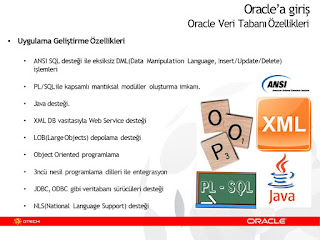
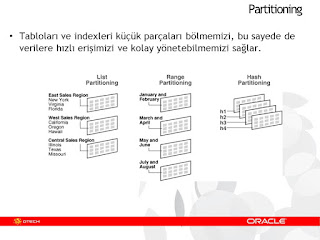
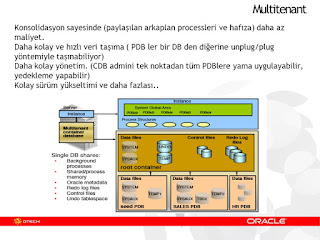
This presentation is about Oracle technologies and products.
In this presentation, we take a quick look at the main Oracle technologies and Oracle products..
In addition to that, we try to give a filtered information about the Oracle job roles in demand..
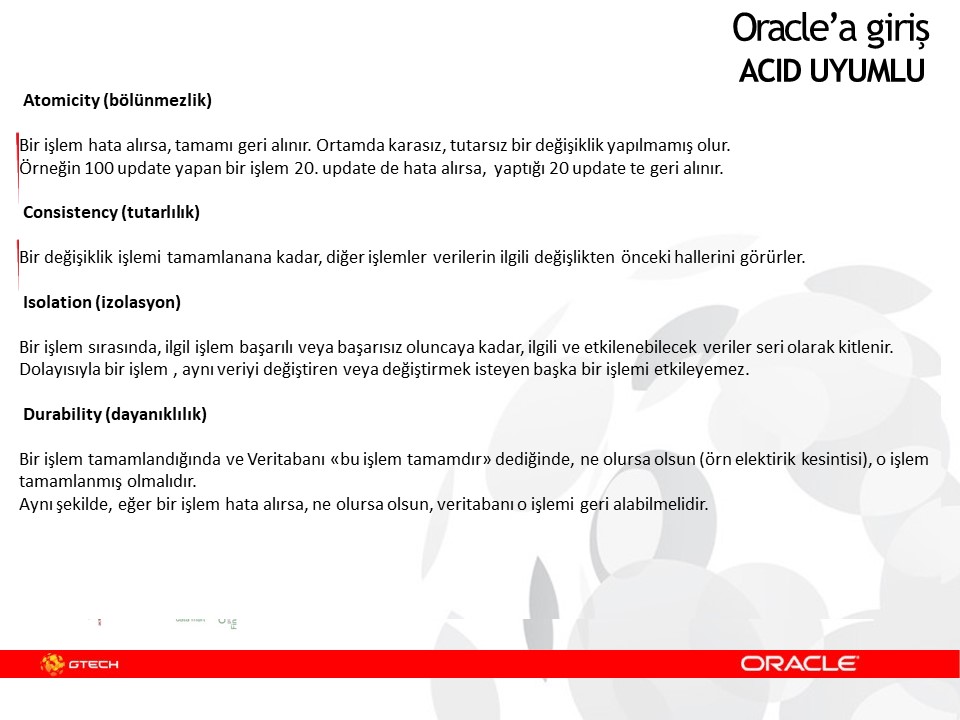
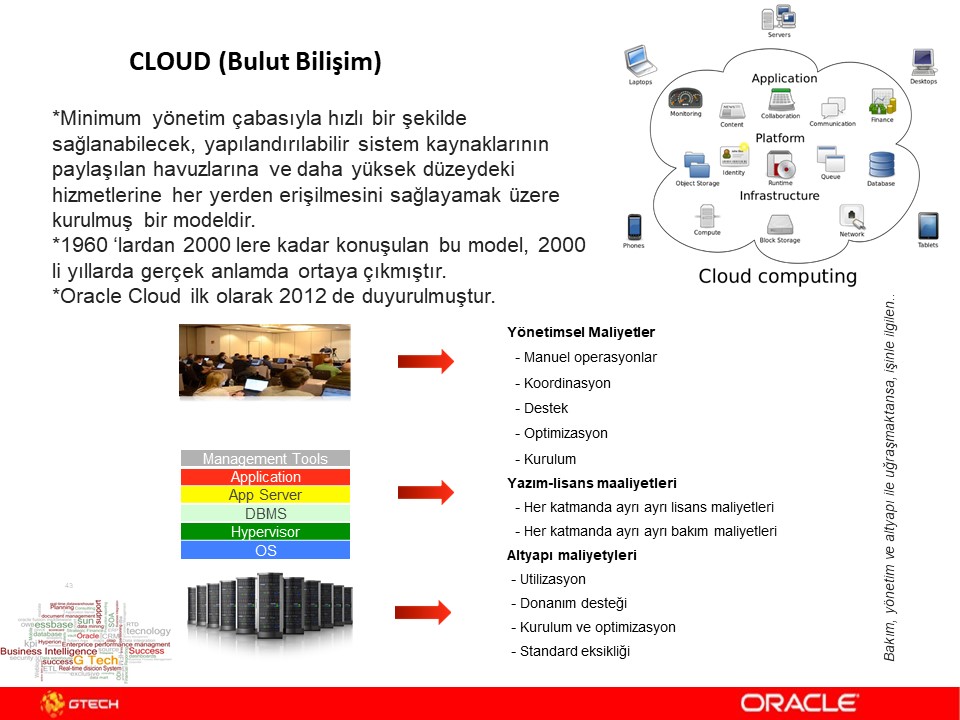
Here is a quick look at the slides ->
-- the contents of the slides are in Turkish -- ofcourse, I will translate them to english -- when I have a time :)










In these seminars, we talk about 3 main subjects.
1) We first introduce Oracle to the audience.
2) Then we continue with the subject -> "How to make a career in Oracle".
3) Lastly, we intdroduce the main Oracle Technologies and Oracle Products to the audience.


It is quite good to talk about these subjects with the university students.. Also, we get good questions while delivering our presentations.
I just wanted to share one of the presentations that we use in these seminars.
This presentation is about Oracle technologies and products.
In this presentation, we take a quick look at the main Oracle technologies and Oracle products..
In addition to that, we try to give a filtered information about the Oracle job roles in demand..
Here is a quick look at the slides ->
-- the contents of the slides are in Turkish -- ofcourse, I will translate them to english -- when I have a time :)








Subscribe to:
Posts
(
Atom
)