Friday, January 31, 2014

DataPump impdp Raises Error ORA-942 When Creating Index

While importing a database using impdb you can get ORA-00942 error during an index creation. As you know ORA-00942 means table or view does not exist. So when you see this error in an index creation, Oracle actually says that : I cant create the index because the underlying table is not there, even if it is there I can not the see the table because you dont have necessary privileges :)
That is, this error can be generated if the calling schema/user doesn't have the required privileges for the action, as well
Also note that even if we do the import with sys user , we can still get this error in an import process..
The reason behind that is the design of impdb.. So it is expected.. That is ; When impdp creates indexes, it connects to the schema owner before issuing the CREATE INDEX command. So if the schema owner does not have the privilege to create an index on a table, the error ORA-00942 is generated.

For the solution, grant necessary privileges to the user which is the owner of the index..
Note that , you can always create an index later.. So if you have done your import and if you dont want to repeat it, then parse the logfile, find the problematic index creations and create them manually.

EBS-- impdb ORA-39083, ignorable APPS trigger creation error

During the import process of an EBS(11i --11.5.0.2) database using impdb , you can get ORA-39083 and ORA-25001 errors..
ORA-39083: Object type TRIGGER failed to create with error:
ORA-25001: cannot create this trigger type on views.

Note that the triggers below are obsolete in 11.5.1 or higher:
APPS.RA_ADDRESSES_T1_VEH
APPS.AR_CUSTOMER_PROFILES_BRU
APPS.AR_CUST_PROFILE_AMOUNTS_BRU
APPS.RA_ADDRESSES_BRIU

The related base tables are still exists but they are not used anymore. They are replaced with TCA architecture (HZ_ tables).
So if the trigger that this error is produced for, is one of the above , then the error is ignorable.

This is well documented in MOS DOC: 1170463.1

RDBMS --expdp ORA-39095: Dump file space has been exhausted

When exporting the whole database using datapump, ORA-39095 can be encountered. It seems it is caused by an unpublished bug 7486649 and fixed in version 11.2..
The reason behind the error seems to be the FILESIZE parameter used with expdp command..
The workaround is to increase the size used in FILESIZE parameter or to not to use the FILESIZE parameter at all..

I have faced this problem with a 10.2.0.4 EBS database. 
I checked Oracle Support. Related Oracle MOS documents say using the dynamic format can prevent this error to arise, but I already tried that and it was not the solution for me.

The solution I applied was increasing the FILESIZE parameter. By increasing the FILESIZE parameter you will have less number of dump file pieces and you wont get ORA-39095 while exporting your big size database. Because it seems sometimes datapump throws this error even if you set your dumpfile parameter to support several number of dump file pieces (like 99 -> with dumpfile=fullexp%U.dmp)

EBS -- Datapump expdp error ORA-33272 , ZPB, DBMS_AW, dba_aws

While exporting an EBS 11i database using datapump , you can get ORA-33272 error on Analytical Workspaces..
This errors are mostly due to the versions of aw objects..
Suppose you have upgraded your Ebs database from 9i to 10g and the AW objects belong to 9i version of Oracle Database have remained in your database..  In such a situation, you can encounter ORA-33272 error on your future data pump exports..

An example for these kind of errors are below;

ORA-39127: unexpected error from call to export_string :=SYS.DBMS_AW_EXP.schema_info_exp('ZPB',1,1,'10.02.00.00.00',newblock)
ORA-33272: Analytic workspace ZPB.ZPBCODE cannot be opened.
ORA-00600: internal error code, arguments: [xschkmk:!dict], [], [], [], [], [], [], []
ORA-06512: at "SYS.DBMS_AW", line 67
ORA-06512: at "SYS.DBMS_AW", line 131
ORA-06512: at "SYS.DBMS_AW", line 792
ORA-06512: at "SYS.DBMS_AW", line 1142
ORA-06512: at "SYS.DBMS_AW_EXP", line 517
ORA-06512: at line 1
ORA-06512: at "SYS.DB.

For the solution, use following query to list the version for the object in question;

select * from all_aws where owner='ZPB';  (ZPB is the schema name of failing objects in the example above)

SQL> select * from dba_aws;

Example output:
OWNER AW_NUMBER AW_NAME AW_V PAGESPACES GENERATIONS FROZEN
---------- ---------- -------------------- ---- ---------- ----------- ------
ZPB 1000 ZPBCODE 9.1 292 2
SYS 129 AWREPORT 10.2 9 2
SYS 128 AWXML 10.2 64 2
ZPB 1001 ZPBANNOT 9.1 7 1
ZPB 1002 ZPBDATA 9.1 7 1
SYS 125 AWMD 10.2 363 2
SYS 124 EXPRESS 10.2 46 2
SYS 126 AWCREATE 10.2 21 2
SYS 127 AWCREATE10G 10.2 9 2


Analyze the output of the query and if you have older versions, delete them..
For the example above: the ZPB Aws are 9i and they are need to be deleted.

You can use dbms_aw.execute to do that..

exec dbms_aw.execute('aw delete zpb.zpbcode');
exec dbms_aw.execute('aw delete zpb.zpbannot');
exec dbms_aw.execute('aw delete zpb.zpbdata');

Log in AS ZPB
SQL> set serverout on
SQL> call dbms_aw.execute('AW DELETE ZPBCODE');
SQL> call dbms_aw.execute('AW DELETE ZPBANNOT');
SQL> call dbms_aw.execute('AW DELETE ZPBDATA');
If you receive errors deleting the AWs, drop the associated AW$ tables :
AS SYS:
SQL> drop table AW$ZPBCODE;
SQL> drop table AW$ZPBANNOT;
SQL> drop table AW$ZPBDATA;

select * from dba_aws;

SYS 125 AWREPORT 9.1 9 2
SYS 124 AWXML 9.1 50 2
SYS 123 AWCREATE10G 9.1 9 2
SYS 122 AWCREATE 9.1 18 2
SYS 121 AWMD 9.1 205 2
SYS 120 EXPRESS 9.1 38 2

Also if you have all 9i 's in awr$ table, then you may be need to -> Remove OLAP, Clean up Left Over Objects And Add It back (Doc ID 1560841.1)

Thursday, January 30, 2014

Is my index/index (sub)partition unusable? N/A state indexes, Exadata

When you work with Exadata , we usually compress the data /the tables.. One of the method to compress the data in the tables, which the compress atrribute set on, is moving the table with "alter table move command" .. Note that, Exadata is a preferred system for large databases in which the tables are partitioned even subpartitioned. So in that case; you need move these partitions and subpartitions, too..

When the tables/partitions/subpartitions are moved, the indexes become invalid, as moving is a physical operation which causes the rowid stored in related indexes change..
So you need to rebuild the indexes , index partition and index partitions, accordingly...

To find the indexes those need to be rebuilt, you can use following queries.. The queries below are actually dynamic sqls which will produce the rebuild commands directly..

Sub partition rebuild:
select 'alter index '||index_owner||'.'||index_name||' rebuild subpartition '||subpartition_name||' parallel 8;' from dbA_ind_subpartitions where status not in ('USABLE','VALID')

Partition rebuild:
select 'alter index '||index_owner||'.'||index_name||' rebuild partition '||partition_name||' parallel 8;' from dbA_ind_partitions  where status not in ('USABLE','VALID')

Index rebuild:
select 'alter index '||owner||'.'||index_name||' rebuild parallel 8;' from dbA_indexes  where status not in ('USABLE','VALID')

The thing that me writing this post is the index status N/A.
There are indexes in N/A status and  N/A status does not mean that the index must be rebuilt..
You have to analyze this N/A status in levels. I mean, lets suppose dba_indexes = LEVEL1, dba_partitions=LEVEL2, dba_subpartitions=LEVEL3

So if you see a N/A state index in dba_indexes, check dba_ind_partitions..
And if you see a N/A state index partition in dba_ind_partitions check dba_ind_subpartitions :)
so check LEVEL1 -> LEVEL 2 -> LEVEL 3.
In brief, you dont rebuild every N/A state index you see :)

tnsing TNS-03507 Even Though SQL*Net Succeeds

This error can be encountered using tnsping binary stored in 8.0.6 Oracle Home;
Here is was happens,
[applexadata@ermanapp ~]$ tnsping EXADEV_806_BALANCE
TNS Ping Utility for Linux: Version 8.0.6.3.0 - Production on 24-JAN-2014 16:24:39
(c) Copyright 1997 Oracle Corporation. All rights reserved.
TNS-03507: Failure looking for ADDRESS keyword

As you see above , we cant ping the defined listener through EXADEV_806_BALANCE using tnsping
But, when we use sqlplus stored in same 8.0.6 Oracle home to connect to the same database through the same tns entry, we can connect successfully.
sqlplus apps/apps@EXADEV_806_BALANCE;

SQL*Plus: Release 8.0.6.0.0 - Production on Fri Jan 24 16:24:40 2014
(c) Copyright 1999 Oracle Corporation. All rights reserved.
Connected to:
Oracle Database 11g Enterprise Edition Release 11.2.0.3.0 - 64bit Production
With the Partitioning, Real Application Clusters, Automatic Storage Management, OLAP,
Data Mining and Real Application Testing options
SQL>  --> connected successfully.

So this is the problem of tnsping utility stored in 8.0.6 Oracle Home. Maybe the reason is its low software version.. It seems it does not like the format of the tns entry EXADEV_806_BALANCE generated by autoconfig..

Ignore these tnsping error if your application works properly.. Does you EBS components connect to the database using the BALANCE tns properly? Because, this seems to be important.

Oracle describes this as follows :)

The tnsping/tnsping80 utility is not designed in such a way that it will parse a Load Balancing tnsnames.ora file. Since tnsping is a test utility and SQL*Plus connections work, there is no need for any modification in the tnsnames parameter file.

EBS on Oracle RAC / Exadata LOAD BALANCE connections

As you know, techonology used in EBS are actually a collection.. We have Forms, Reports, Concurrent Managers, Apache/Web Server, External Reporting tools etc.
These different technologies --components are connecting to the EBS databases seperately.
These situation brings us an opportunity to isolate database nodes according to the Application Components.
That is, if we want, we can configure these components(Apache, Conc Managers, Forms, Reports and or external tools) to use only Database Node 1 for its sessions or we can configure Apache to use Database Node 1 and Node 2 load balanced..


In a Rac Environment we usually prefer to use a load balanced connection style for EBS Application Tier components. Of course, sometimes in some environments; we feel the need to isolate database nodes according to the components, workload and etc..
In short, to make the long story short, In this post I will describe how to make these configurations in EBS.

Briefly, we have a file called context file in EBS and this file feeds the Autoconfig.. That is, Autoconfig reads this file to make the necessary configurations in EBS components.
So to able to make the configurations described above, we need to change the following lines in context file and run autoconfig.

<TWO_TASK oa_var="s_tools_twotask" osd="unix">EXADEV</TWO_TASK>
<TOOLS_DB_TWOTASK oa_var="s_tools_db_twotask">EXADEV_806_BALANCE</TOOLS_DB_TWOTASK>
<CP_TWOTASK oa_var="s_cp_twotask">EXADEV</CP_TWOTASK>
<TWO_TASK oa_var="s_weboh_twotask" osd="unix">EXADEV</TWO_TASK>
<WEBOH_DB_TWOTASK oa_var="s_weboh_db_twotask">EXADEV_806_BALANCE</WEBOH_DB_TWOTASK>


We change the values stored in xml tags according to tnsnames.ora stored in relevant Oracle Homes ( I mean IAS ORACLE_HOME and 8.0.6 ORACLE_HOME for 11i and 10.1.2 ORACLE_HOME and 10.1.3 ORACLE_HOME for R12)

Normally, when we have 2 nodes database in EBS we have the following tns entries in our Application tier's ORACLE HOMES ..
Lets suppose our database Service Name is EXADEV and also suppose we dont have any scan listeners ( as you know they are not supported in EBS 11i)
EXADEV=
(DESCRIPTION=
(ADDRESS=(PROTOCOL=tcp)(HOST=EXADBADM01)(PORT=1521))
(CONNECT_DATA=
(SERVICE_NAME=EXADEV)
(INSTANCE_NAME=EXADEV1)
)
)
EXADEV1=
(DESCRIPTION=
(ADDRESS=(PROTOCOL=tcp)(HOST=EXADBADM01)(PORT=1521))
(CONNECT_DATA=
(SERVICE_NAME=EXADEV)
(INSTANCE_NAME=EXADEV1)
)
)
EXADEV1_FO=
(DESCRIPTION=
(ADDRESS=(PROTOCOL=tcp)(HOST=EXADBADM01)(PORT=1521))
(CONNECT_DATA=
(SERVICE_NAME=EXADEV)
(INSTANCE_NAME=EXADEV1)
)
)
EXADEV2=
(DESCRIPTION=
(ADDRESS=(PROTOCOL=tcp)(HOST=EXADBADM02)(PORT=1521))
(CONNECT_DATA=
(SERVICE_NAME=EXADEV)
(INSTANCE_NAME=EXADEV2)
)
)
EXADEV2_FO=
(DESCRIPTION=
(ADDRESS=(PROTOCOL=tcp)(HOST=EXADBADM02)(PORT=1521))
(CONNECT_DATA=
(SERVICE_NAME=EXADEV)
(INSTANCE_NAME=EXADEV2)
)
)
EXADEV_806_BALANCE=
(DESCRIPTION_LIST=
(DESCRIPTION=
(ADDRESS=(PROTOCOL=tcp)(HOST=EXADBADM02)(PORT=1521))
(CONNECT_DATA=
(SERVICE_NAME=EXADEV)
(INSTANCE_NAME=EXADEV2)
)
)
(DESCRIPTION=
(ADDRESS=(PROTOCOL=tcp)(HOST=EXADBADM01)(PORT=1521))
(CONNECT_DATA=
(SERVICE_NAME=EXADEV)
(INSTANCE_NAME=EXADEV1)
)
)
)
EXADEV_FO=
(DESCRIPTION=
(ADDRESS=(PROTOCOL=tcp)(HOST=EXADBADM01)(PORT=1521))
(CONNECT_DATA=
(SERVICE_NAME=EXADEV)
(INSTANCE_NAME=EXADEV1)
)
)
EXADEV_BALANCE=
(DESCRIPTION=
(LOAD_BALANCE=YES)
(FAILOVER=YES)
(ADDRESS_LIST=
(ADDRESS=(PROTOCOL=tcp)(HOST=EXADBADM02)(PORT=1521))
(ADDRESS=(PROTOCOL=tcp)(HOST=EXADBADM01)(PORT=1521))
)
(CONNECT_DATA=
(SERVICE_NAME=EXADEV)
)
)

So by looking to the tns entries above, we can change the context file and run the autoconfig to make the configurations according to our need..
For example;
According to the tns entries above, If we want an application tier component to connect to our cluster in a load balanced manner, we use EXADEV_BALANCE tns entry or If we have a compontent to use only the Database Node 2, we use EXADEV2 tns_entry and so on.

Hope this helps..

Of course, we have parallel concurrent processing and Application node load balancing but these subject will be described in forthcoming blog posts of mine..

DBMS_STATS error gathering fixed object stats ORA-20000 ORA-6512 insufficient privileges

While gathering fixed objects status using DBMS_STATS.GATHER_FIXED_OBJECTS_STATS('ALL'), you can
encounter the following error;
ORA-20000 ORA-6512.. 
Error stack can be similar to following;
ORA-20000: Insufficient privileges to analyze an object in Fixed Ob
ORA-06512: at "SYS.DBMS_STATS"
ORA-06512: at line 1

Anyways, these errors are due to a error syntax.. 
Some Oracle documents say gather_fixed_objects_stats should be executed with 'ALL'  input,
but it seem they are wrong.. 
For example: E-Business Suite on Exadata Oracle Maximum Availability Architecture White Paper,October 2012
Because, DBMS_STATS.GATHER_FIXED_OBJECTS_STATS can take a parameter but it has
 to be an existingstatistics table created with DBMS_STATS.CREATE_STAT_TABLE.
(Reference Mos Document: 392364.1 )

For the solution; drop the 'ALL' argument and run the proc as follows;
DBMS_STATS.GATHER_FIXED_OBJECTS_STATS();

Tuesday, January 21, 2014

Linux-- cron.daily hangs, mcelog hangs, Xen kernel, XenStoreD, /sys/hypervisor/uuid

In one of our client's production environments , we have faced an incident.
After startup (approximately 1 day after startup), the Linux server, which was a Redhat Linux 5.4 64 bit (with 2.6.18-164.el5xen  kernel) started to experience a high load.

Okay, I will keep it short;
The reason behing the problem was that the machine had 6 gig memory and it was all being used.  Actually this was due to a high process count on the Linux.. Because, when I checked processes with ps ; I saw that there were a lot of crond processes, the cron was trying to execute what was scheduled to run hourly (cron.hourly).. I didnt go in to details and analyze it further to prove that was the cause , because it was obviously the cause :)
Going down from the parent to child I saw that cron was trying to execute mcelog script, and the script was looping / hanging..
Going down from the parent to child processes again ; I saw that the script was trying to do the following;
cat /sys/hypervisor/uuid` != "00000000-0000-0000-0000-000000000000"
The cat command could not be finished. The relevant process was in D state, in other words waiting for I/O.

Then, I checked the mcelog dailiy script , it was like below;

if [ -e /proc/xen ] && [ `cat /sys/hypervisor/uuid` != "00000000-0000-0000-0000-000000000000" ]; 
then
# this is a PV Xen guest. Do not run mcelog.
 exit 1;
else
/usr/sbin/mcelog --ignorenodev --filter >> /var/log/mcelog
fi

So, The crond was running mcelog.cron which is supplied by the mcelog package..
The kernel was a xen kernel, and xen related software packages was running on it..
Note that, there was no need for a Xen kernel to be used in this server, but it s another story :)

Brief explanatin about the Xen /hypervisor ,  as Xen is a native (bare-metal) hypervisor providing services that allow multiple computer operating systems to execute on the samecomputer hardware concurrently.
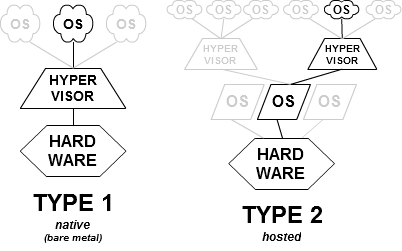
Hyperviseur.png

Anyways;
I found a similar bug in Suse, not Redhat Linux but it seems we were hitting something like the following,

patches.xen/499-sysfs-uuid-hang.patch: Avoid kernel hang reading
+ /sys/hypervisor/uuid if xenstore is not available.
Also look at the following;

Also this is from Redhat 5:

Bug 225203 Reading /sys/hypervisor/uuid in Dom0 hangs if XenStoreD isn't running
Description of problem: Attempting to read from /sys/hypervisor/uuid in Dom0 will hang indefinitely if XenStored hasn't been launched. Version-Release number of selected component (if applicable): uname -r 2.6.18-1.2747.el5xen
kernel-xen-2.6.18-1.2747.el

In conclusion;

we can say that, the mcelog was trying to gather some vm related information(vm domain based information) from XenStore, using Xenstore daemon, and Xenstore daemon was not running , we were hitting a bug in Redhat 5 caused  by the bug described above, as the /sys/hypervisor/uuid path relies on Xenstore to query the domain's UUID (handle) .

Possible solutions are:
  • Editing the mcelog.cron script, commenting all of the lines and putting and exit 0 at the end of the file..
  • Checking  with kill -0 `cat /var/run/xenstore.pid`, before reading the /sys/hypervisor/uuid
  • The code in the script can change something like the following; ( I didnt test it)

           if [ -e /proc/xen/capabilities ] 
           # xen 
           grep control_d /proc/xen/capabilities >& /dev/null if [ $? -ne 0 ] 
           # domU -- do not run on xen PV guest 
           return 1; 
           fi 
           fi

Monday, January 20, 2014

EBS-- Authorization Required , mod_plsql, wdbsrv.app fil, custom_auth

This problem arises in EBS, when the mod_plsql is in use. In my case, the victim was an Oracle Form that was trying to use mod_plsql to display some data..  (Note that , you can encounter this error in Apex, or in any Oracle Product that is using Oracle Application Server and mod_plsql..

The problematic web page was producing the following error in a little windows message box , which made me think it is a client error, in first sight.


Authorization Required

The error is similar to the following;
This server could not verify that you are authorized to access the document
requested. Either you supplied the wrong credentials (e.g., bad password), or
your browser doesn't understand how to supply the credentials required.


In addition , the Apache error log was displaying the following error.
HTTP-401 Authorization Required' error message

After some analysis, it could be figured out that, the problem was caused in the mod_plsql layer..
So lets describe what are the configuration file that is used by the mod_plsql to operate..

The wdbsvr.app file is where the DADs (Database Access Descriptors) are defined.. Using DADs, PL/SQL gateway(mod_plsql) can connect to the relevant databases..
Mod_plsql, in other words PLSQL gateway; is a part of Oracle HTTP Server (in this case Apache). Using mod_plsql ; a URL sent by a browser is interpreted, the associated plsql programs are called and the response is returned to calling browser..

Following describes the flow in mod plsql processing;
  • The Oracle HTTP Server receives a request containing a virtual path, which is configured to be serviced by mod_plsql.
  • The Oracle HTTP Server routes the request to mod_plsql.
  • By using the configuration information stored in your DAD, mod_plsql connects to the database. The request is forwarded by mod_plsql to the Oracle Database.
  • mod_plsql prepares the call parameters, and invokes the PL/SQL procedure in the application.
  • The PL/SQL procedure generates an HTML page using data and the PL/SQL Web Toolkit accessed from the database.
  • The response is returned to mod_plsql.
  • The Oracle HTTP Server sends the response to the client browser.
Okay, lets come back to our subject.. wdbsrv.app file..

Here is an example for wdbsrv.app file;

[WVGATEWAY]
defaultDAD      = ERM
administrators  = system
adminPath       = /admin_/
custom_auth     = CUSTOM
;
[DAD_ERM_admin]
connect_string  = PROD
cgi_env_list=SERVER_NAME=erman1.erman.com.tr,REQUEST_PROTOCOL=http,SERVER_PORT=8000,HOST=erman1.erman.com.tr:8000
input_filtering = Yes
;
[DAD_ERM]
connect_string  = ERM
password        = erman
username        = APPS
default_page    = fnd_web.ping
document_table  = APPS.fnd_lobs_document
document_path   = docs
document_proc   =
upload_as_long_raw =
upload_as_blob  = *
reuse           = Yes
connmax         = 10
pathalias       = fndgfm
pathaliasproc   = fnd_gfm.dispatch
enablesso       = No
cgi_env_list=SERVER_NAME=erman1.erman.com.tr,REQUEST_PROTOCOL=http,SERVER_PORT=8000,HOST=erman1.erman.co.tr:8000
input_filtering = Yes
stateful=STATELESS_RESET
;
...
.....
.......

Anyways, I will keep it short. 
Pay attention to the custom_auth parameter above, because that parameter is the cause of the error. This parameter is used  for custom authentication and is an old configuration used in ias 1.0.2.2.2 and it causes problems with later mod_plsql applications.
For the solution, comment out the custom_auth parameter by putting a ";" character at the beginning of the line and bounce Oracle HTTP Server.